Developer workflow
Updating application images
This is a document for how developers should be interacting with the OneConnect Infrastructure. This should serve as live documentation for the CI/CD workflow as it develops.
Currently we have a few expectations that make development slightly more annoying for developers. The expected workflow for a developer working on an image is as follows:
- Developer makes a change to a particular repo, for example
feature-user-backend.- The change must be small.
- The change must have comprehensive automated test coverage.
- Developer will push a
gerritreview and iterate the patch until it's ready. - Developer will push to the
masterbranch. - Developer will ensure that the image pipeline was successful.
- Any pipeline issues that are identified are fixed before moving on.
To run the image pipeline, it is necessary to add a Jenkins job before submitting a patch.
Jenkins jobs should be added when a new repository is created.
- Any pipeline issues that are identified are fixed before moving on.
To run the image pipeline, it is necessary to add a Jenkins job before submitting a patch.
- Developer will update the image tags in the argocd-oc-apps repository.
- Grep for their image name
feature-user-backend, and update all image tags in each Kubernetes Overlay. - Open a Pull Request to the repository.
- Get at least one review.
- Squash and merge the PR.
- Grep for their image name
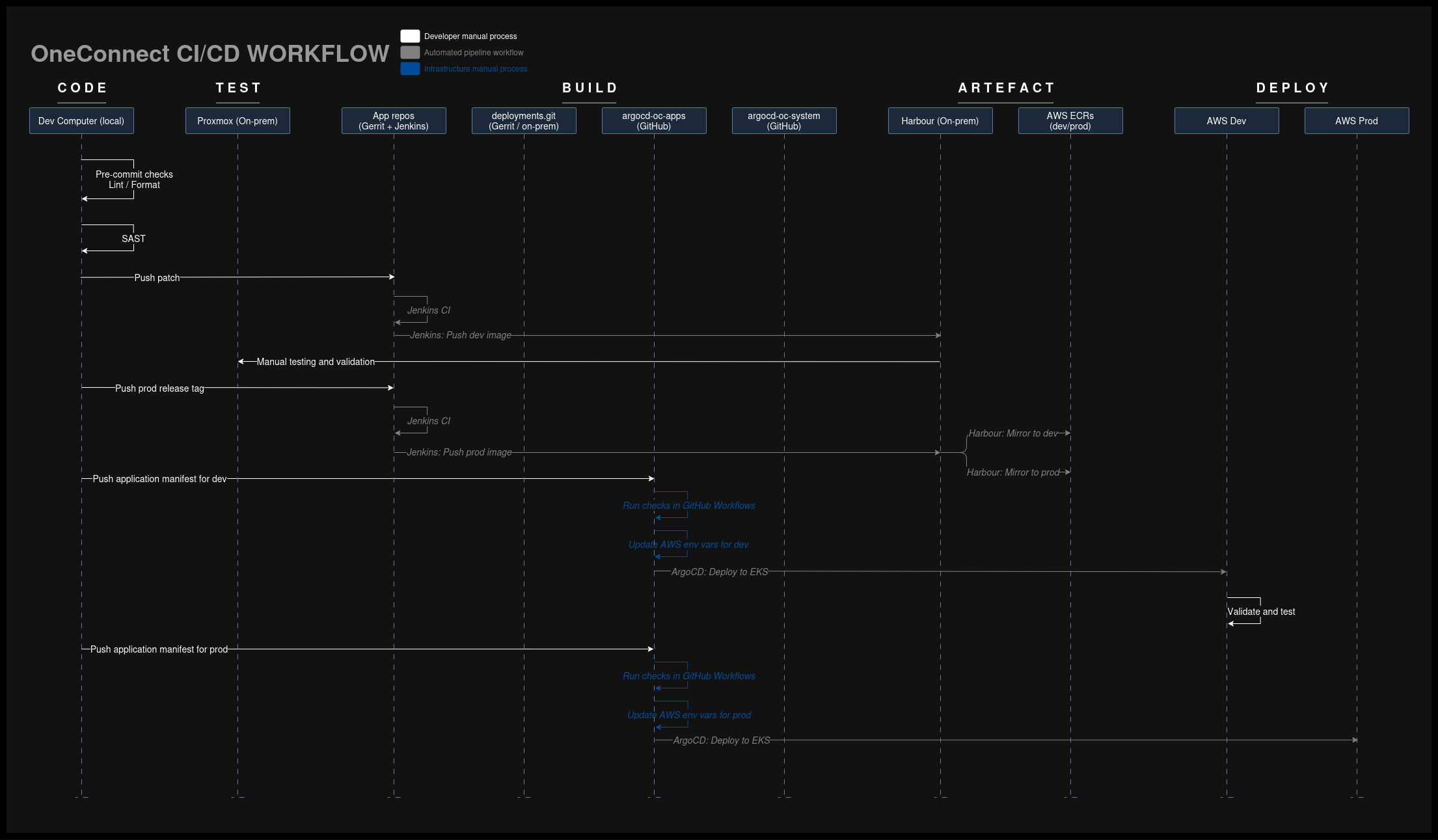
This process can be seen in full in the digram below:
Environment variables
All OneConnect applications share a common configmap unique to each AWS environment.
Developers should review the ConfigMap for environment variables available for use for their applications. The DevOps / Infrastructure team will keep these variables up to date as the infrastructure changes.
Developers must also keep their own application's variables up to date in this ConfigMap. URLs, ports, configuration parameters, etc. that an app exposes which are required by other applications must be added here.