Architecture of One Connect
Executive Summary
Lessons Learned from Existing Vista Manager Implementation
- Fine-grained per-user permissions attached to devices don't scale as the cost to compute them per request is prohibitive
- Small isolated single responsibility 'reactive modules' work well for scale and code cleanliness
- Temporal coupling leads to fragile and slow systems; e.g. link updates cannot be processed until the supporting node updates are processed
- Breaking up code into distinct modules with no knowledge of each other is essential to avoid inadvertent coupling between unrelated code
- Endless chains of calls into increasingly unrelated areas are a red flag for architectural design, e.g. Eventwatch updates cascading into a large tree of calls
High-Level Architecture
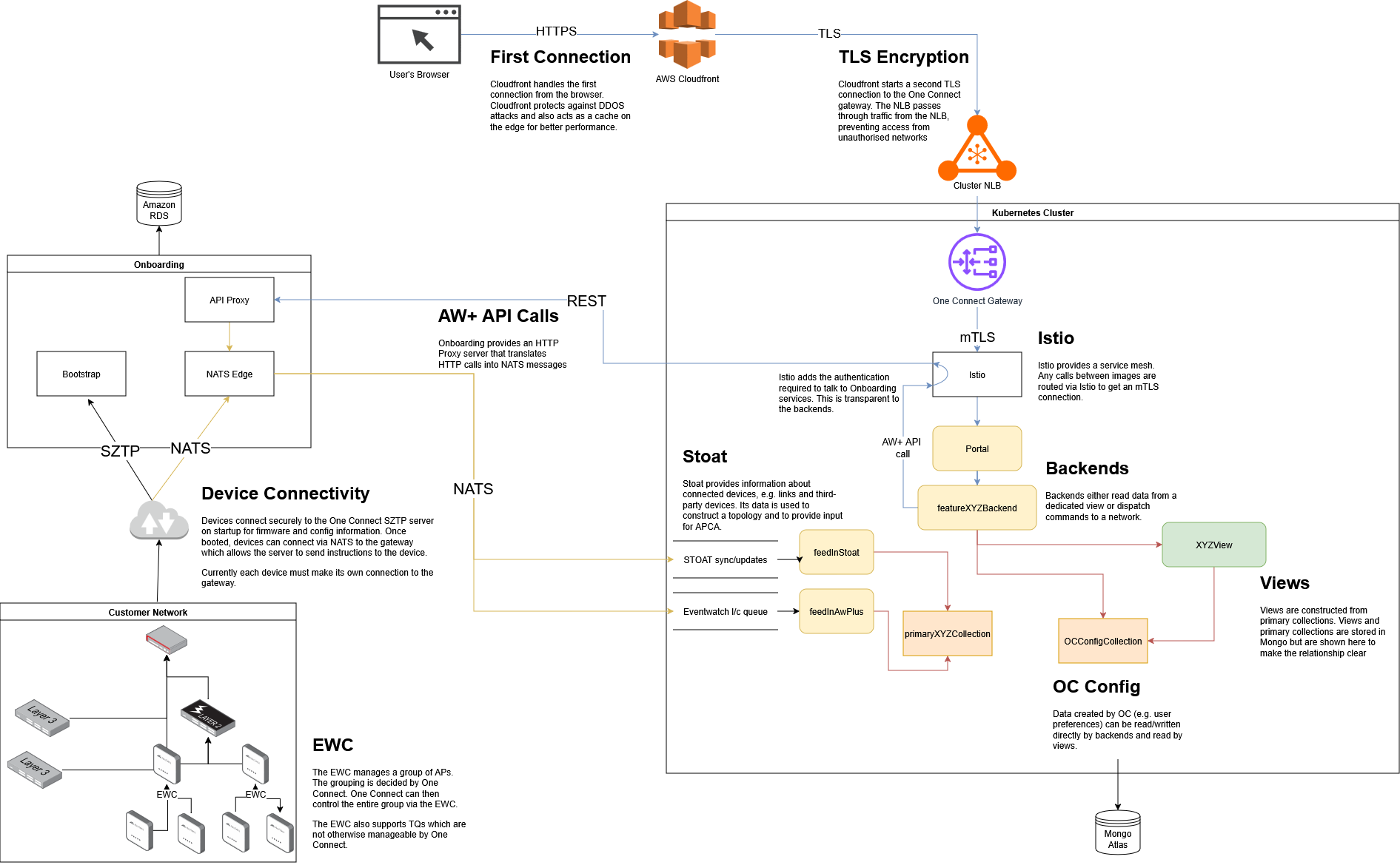
This diagram shows the relationship between the user, the Kubernetes cluster, the Onboarding system and the customer's network. Each of these components communicates with the other using industry-standard protocols. Connections are always encrypted, and the system operates in a 'low-trust' environment where we prevent access from unexpected sources.
This diagram also shows some of the relationship between the different backend processes and the database. Each of these backends are stateless so they can be scaled up and down as required to sustain performance.
The Kubernetes cluster is documented in more detail below.
Terminology
| Term | Description |
|---|---|
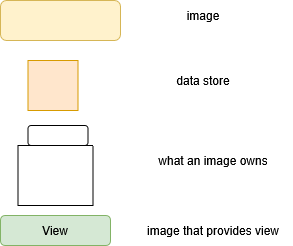
| _Primary | Data that is externally sourced. e.g. Raw data/config from devices. A policy a user created. |
| _View | Interpretations of primary data or other views. e.g. A yang representation of an awplus config or data for an asset management table |
| Feature_Backend | Handles an request from the browser |
Separation of Concerns
The two most general separate of concerns are command and query separation, and primary and view separation.
Command and query separation
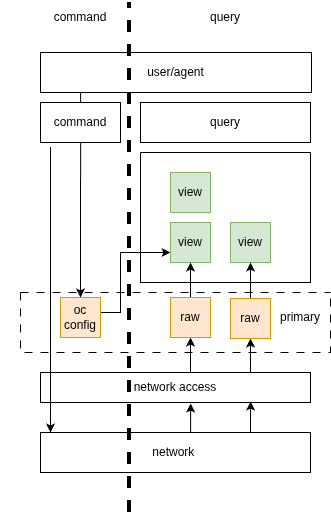
Borrowing from CQRS, we have a separation between commands and queries. Commands are requests to change the state of the system, and queries are requests to read data from the system. This separation allows us to have a clear distinction between the two types of operations, and allows us to optimize each type of operation separately.
Primary and view separation
There is a separation between primary data and views. Primary data is the raw data that is sourced from devices or created by users, and views are interpretations of that data that are used to display information to users or to make decisions. Views ideally can be completely recreated from primary data.
Primary data is externally sourced. e.g. Raw data/config from devices. A policy a user created.
Views are interpretations of primary data or other views. A view can be considered materialised views. Relationships between views should be a DAGs. (no closed loop).
The purpose these divisions is to have a clear separation between each data transformation step allowing each to be understood, scaled and optimized independently.
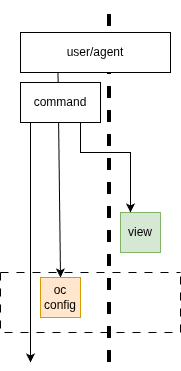
Below is a high level illustration of those two separations. Command on left and queries on the right. Config and data flow from the devices up the right side, becoming more abstract. Commands flow down on the left from the users/agents directing configuration changes to devices. Not all config can be directly applied to a device, some (like a profile) need to be stored in one connect to be subsequently used by users/agents commands to apply config updates to devices.
Query Access
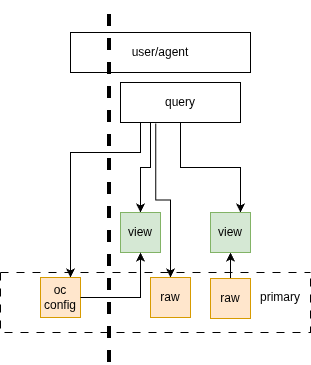
Queries (via a feature backend) should read from primary data and views. The primary data can be either raw data from the devices or oneConnect config (eg a policy/template a user has created)
Command Access
Commands (via a feature backend) can read the data in views to assist in their ability to write to devices. Eg the command may need to look up a proxy device to handle the api request for a particular device.
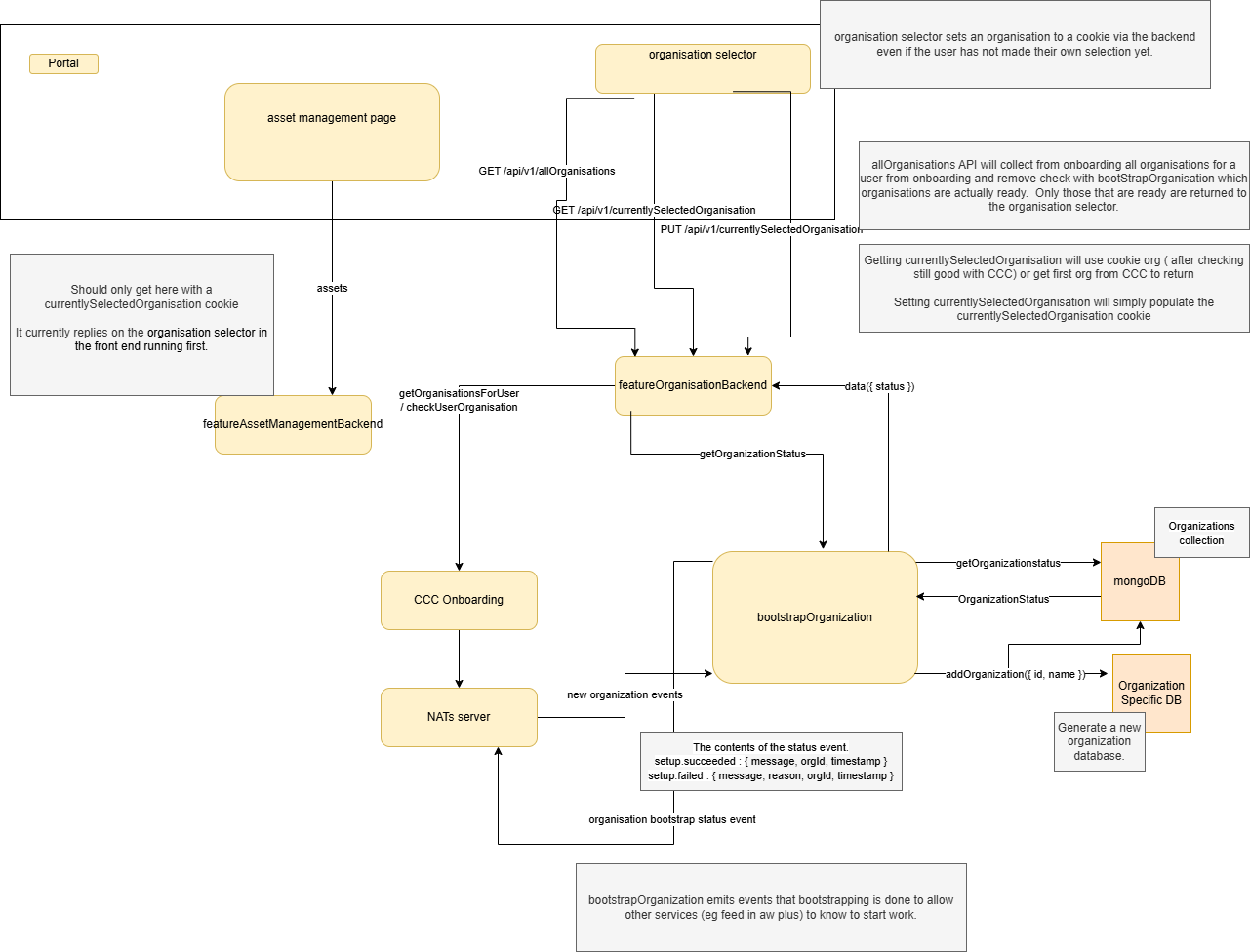
Initialization
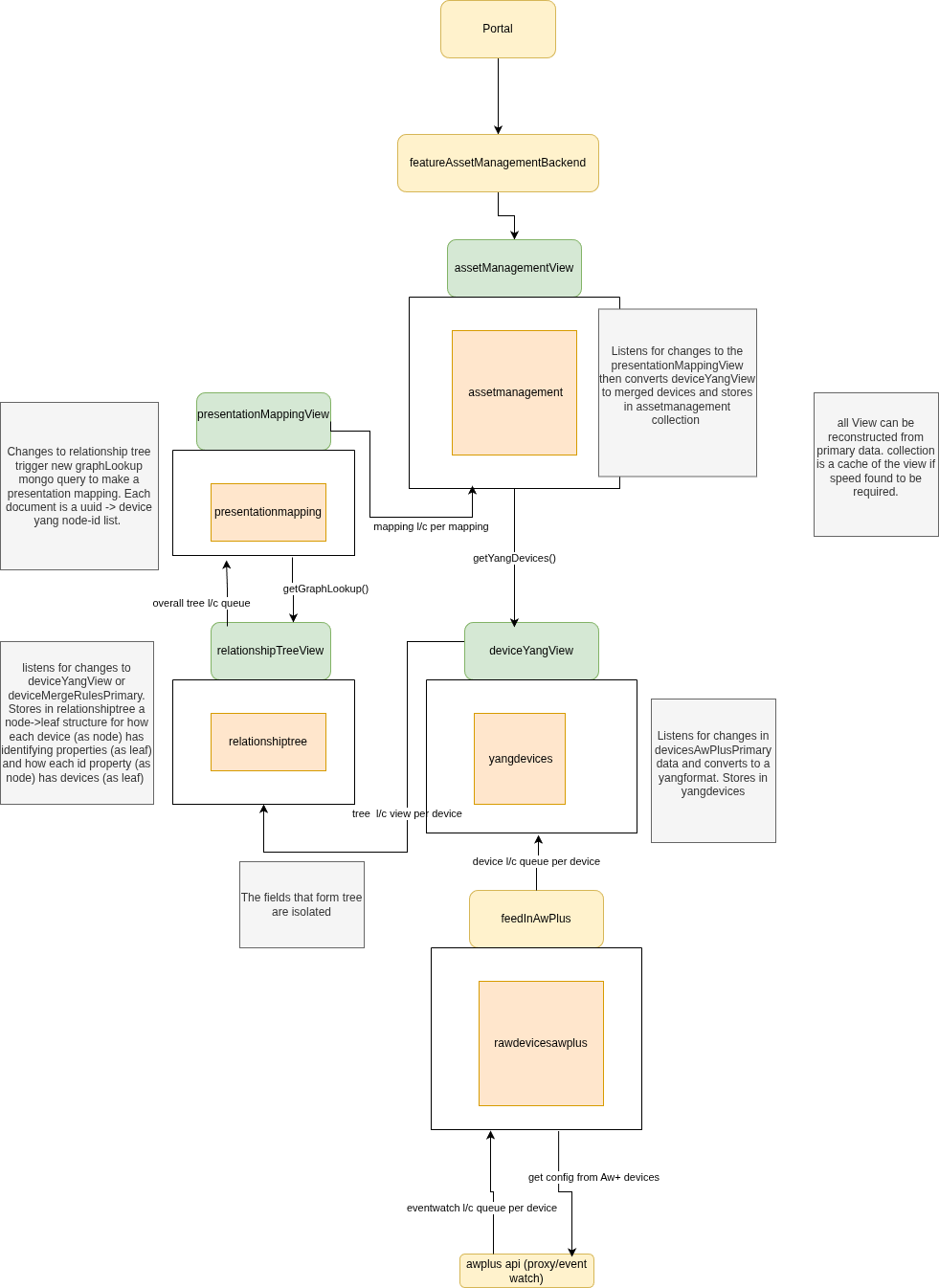
Asset Management
Merge rules
These are rules that dictate how devices from different data sources are merged into a single device
Examples of merge rules include:
- Fields that when matched indicate the same device. e.g mac, serial number, ip address, uuid
- A recording of a decision by a user that two devices are the same device.
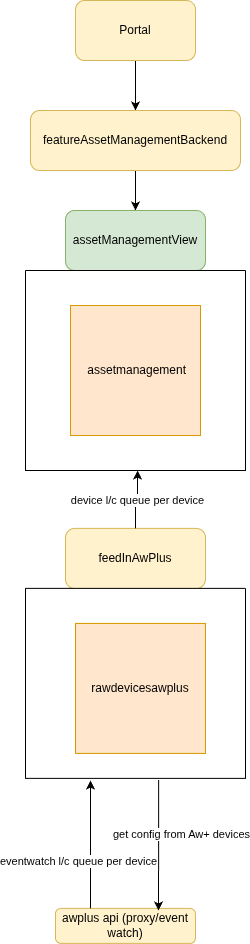
Initial Asset Management
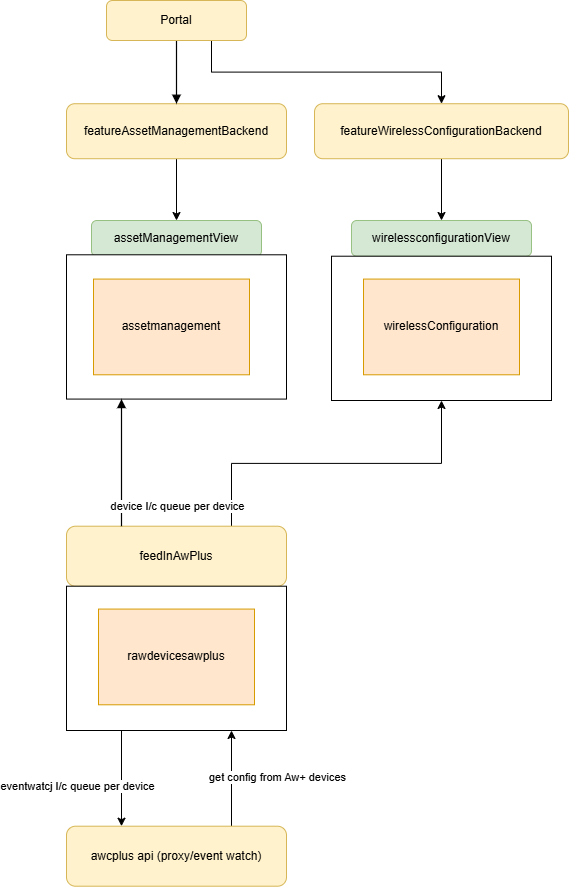
A simplified first version of asset management. No yang conversion, nor merging devices. Plan is to implement this first, then when we have other source of data for same devices we can implement the merging and yang conversion as a separate step.
Events
Events that fire to indicate higher layers should update their views use NATs messages
Initial Wireless
A simplified first version of wireless. Be able to see AP Status details and AP Settings details. Config application is not described here.
NATs Work Queues
latest/current work queue
When to use this
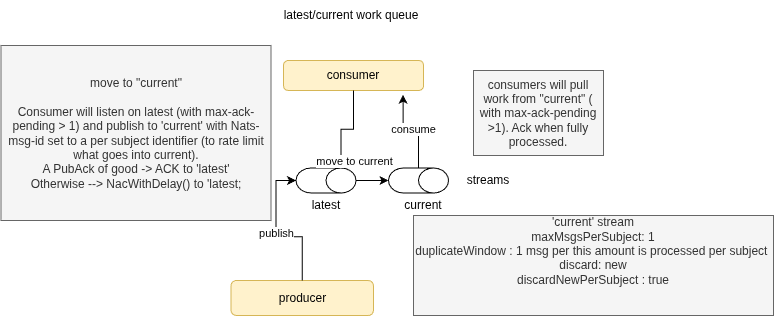
There is a consumer (typically a deployment) that needs to know the latest properties of items external to it. It is not important that every change to those properties is received. It is important that the latest property values are not missed. The items must have a grouping/key (eg per device/user/something) where the consumer should work on items in sequence for any specific one of those groups but work in parallel across different groups.
How does it work?
The NATs stream called 'latest' (in the example picture above), is where a producer dumps (via NATs message) all the latest information for the items in question. The subject is unique per the item (eg per device/user/something). The stream is configured declaratively on the NATs server to only keep the latest message per subject. Messages on this stream are only removed if they are acknowledged by the consumer or if they are replaced by a newer message with the same subject.
The publisher publishees to the 'latest' stream. Of course in practise this stream will have a different name.
The NATs stream called 'current' is the stream owned by the consumer and is the work in process (or about to be in progress) for the consumer pods. The stream is configured declaratively on the NATs server. Messages on this stream are only removed if they are acknowledged by the consumer, which happens after the work is complete. De-duplication is used on this stream to rate limit how often per subject a new message is added from 'latest' stream. Only one message per subject is permitted.
The consumer has two workloads.
One is to consume the 'latest' stream and place each item per subject on the 'current' stream. In the case where the work is already present in 'current' stream a pubAck with an error is received from 'current'. In turn the consumer will nak the message on the 'latest' stream with a delay so it can be picked up later to re-try. If the current stream has had two many additions of the same subject (within the duplcateWindow) then new messages are also rejected. When publishing to the 'current' stream the message header is appended with a NATs-msg-Id set to the key of the item (e.g. device id).
The second workload for the consumer is to consume the 'current' stream and do the work on the item. Once the work is done, the consumer will ack the message on the 'current' stream.
Can't the same be done with just one stream?
No. NATs only provides two options for controlling the length of a queue. Which is an efficient property of the stream we should have as we don't need every message.
One is de-dup which will always discard the latest per subject which is not what we want as consumer will be stuck with old data.
The other is setting the max per subject limit to 1. However, that setting will mean the single message per subject is replaced on every new message for that subject that in turn stimulates pods to pick up the new work for that subject before the previous work is done breaking "consumer should work on items in sequence for any one of those groups.
What if there are multiple different consumers from the same data source?
This is the case of there being more than one deployment interested in exactly the same input. The recommendation in this case is that the producer sends the same message to each of the consumer deployments. Each message would have a subject that includes an identifier for the consumer deployment (e.g. its name). Critically none of these consumer deployment names should be known or coded into the producer. Instead, env vars in the manifest list the 'destinations' of the message.
Feature Flags
Feature flags are the single mechanism used to gate access to functionality across the platform. The backend resolves a user's type (sourced from the JWT) against a set of rules defined in a ConfigMap, producing a list of named flags:
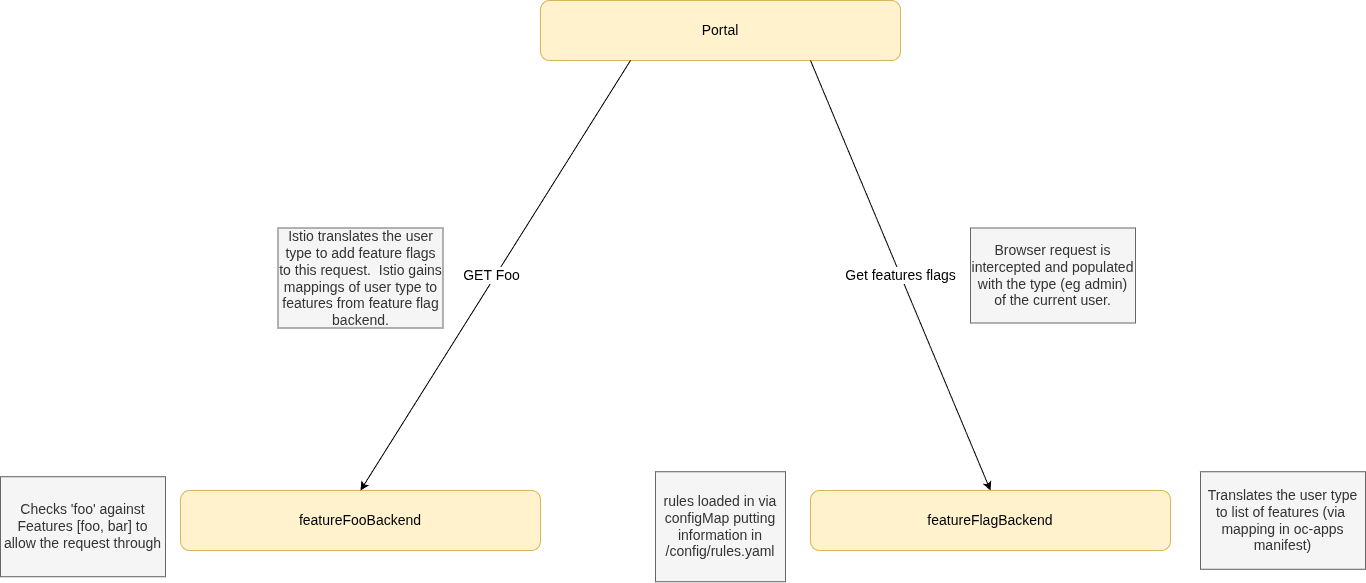
The resolution service is stateless — no database call is required per request. Rule changes are a ConfigMap update, but require a pod restart to take effect. The frontend consumes the resolved flag list directly and has no knowledge of user types or roles.
See the per-repo documentation for full implementation details.
MongoDB Atlas for Primary Data Storage
Vista Manager uses MongoDB for its data storage, and developers in ATLNZ are highly familiar with it. Re-using MongoDB for One Connect potentially allows us to re-use code from Vista Manager, and also means we do not need to re-train developers in a new system.
Some parts of the system use Amazon RDS, e.g. onboarding. These do not need to be rewritten unless there is a compelling reason.
Using MongoDB Atlas, the managed cloud version of MongoDB, means we do not need to manage database backups and security updates ourselves. Cloud systems often support more automatic monitoring than the free community editions, which our platform team can use to monitor performance more easily.
Developers can use either a local installation of MongoDB Community edition, or the free tier of MongoDB Atlas.
Encryption
MongoDB Atlas supports encryption at rest. We will make use of this feature. A more detailed plan is being made in ATCLOUD-1648
Service Mesh
A service mesh is an infrastructure layer for managing how services interact. It provides features like secure communication (mTLS), traffic management, and observability, all without requiring changes to application code.
We use Istio Ambient Mode as a lightweight way to enable mutual TLS (mTLS) between services, minimizing sidecar overhead.