One Connect Login/Logout Flow
This guide documents the login and logout flow for the One Connect application. This includes features such as logging into the application, JWT enrichment, header enrichment, and what happens once a logout occurs.
The architecture used to implement the login flow
When you navigate to the home page of the application, you will be prompted to log in. The reason for this is as follows.
In Oc-Infrastructure, we have an external network gateway that maps to DNS entries such as oneconnect.demo.alliedtelesistest.com or oneconnect.dev.alliedtelesistest.com.
This gateway has two routes: an HTTP (port 80) route that redirects to HTTPS, and an HTTPS (port 443) route. The TLS route has TLS termination enabled and a certificate attached. The gateway has an attached security group that limits access to OneConnect to certain public IP addresses. The subnets field is set to the public subnets of the VPC that the gateway is in.
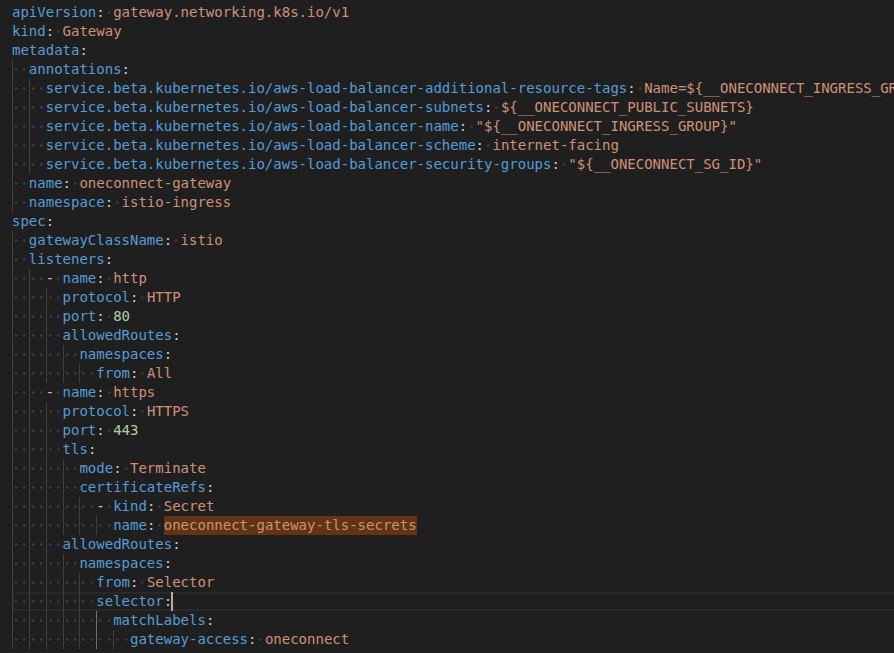
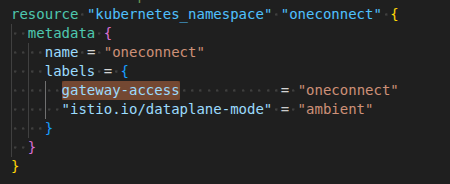
The oneconnect namespace has a label attached to it called gateway-access: oneconnect. The allowedRoutes section of the oneconnect gateway is configured to only allow traffic to be routed to the oneconnect namespace. This label is attached in oc-infrastructure.
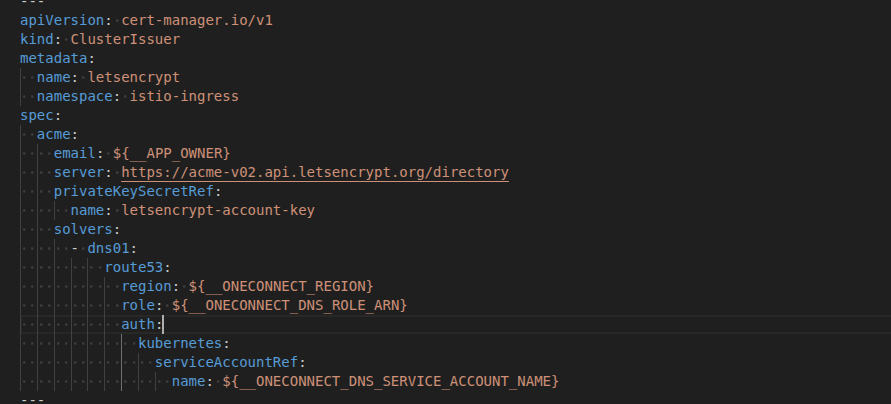
We use Let’s Encrypt to automatically create certificates based on the DNS entries (e.g., oneconnect.demo.alliedtelesistest.com). A service account/role exists in AWS with the required permissions and is attached to a ClusterIssuer resource. This issuer is used to generate and manage the certificates.
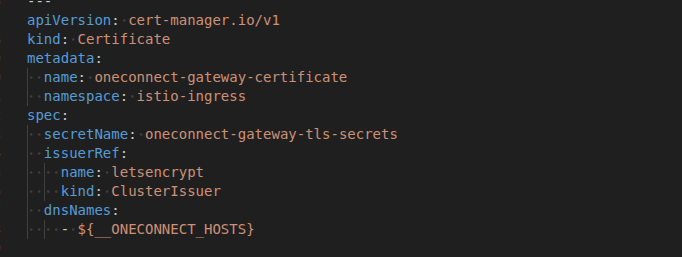
A certificate is then created with the name oneconnect-gateway-tls-secrets, which the gateway points to. The certificate has an array of dnsNames and an issuerRef field indicating that the certificate should be signed by the ClusterIssuer.
Each service in the system is exposed via an associated HTTP route. These routes are configured with a parentRef that points to the oneconnect-gateway, which acts as the central entry point for all incoming traffic.
- Parent Reference: Every route must reference the oneconnect-gateway.
- Path Prefix: Routes define a path prefix (e.g., /user) used to match incoming requests.
- URL Rewrite: The path prefix is removed before forwarding the request to the target service.
This configuration ensures that requests are correctly routed from the gateway to the appropriate backend service.
Example: User Service
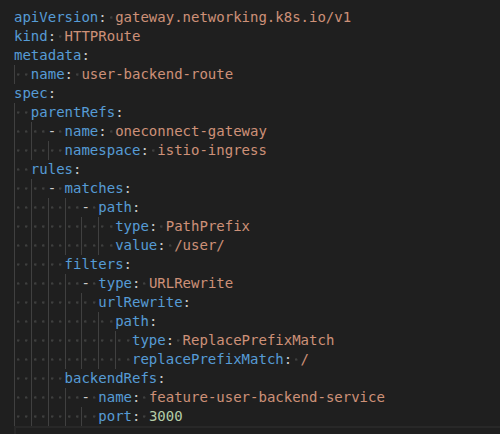
Requests made within the cluster with the /user path prefix are matched to the user service route. The gateway then:
- Matches the incoming request based on the /user prefix
- Rewrites the URL by removing the prefix
- Forwards the request to the user backend service
If a route is not properly attached to the oneconnect-gateway, the gateway will be unable to resolve the request. In such cases, requests will result in a 404 Not Found response, as no routing rule exists for the specified path.
Each service also has an associated Kubernetes Service resource. This service is connected to the waypoint by attaching the labels istio.io/use-waypoint: waypoint and istio.io/ingress-use-waypoint: "true".
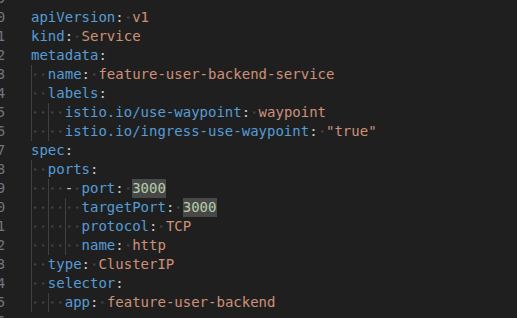
An Istio waypoint proxy is a dedicated Layer 7 proxy used in Istio’s ambient mesh to handle application-level traffic for a group of workloads. It centralizes functions such as routing, security policy enforcement, and observability, eliminating the need for per-pod sidecar proxies and reducing resource overhead. Every time an API call is made to a particular service, it goes through the waypoint. We can add features such as authentication flows, authorization flows, and Envoy filters to the waypoint. Note that we are running our application in ambient mode, a sidecar-less architecture in Istio where shared proxies (ztunnel at Layer 5 and waypoint proxy at Layer 7) handle traffic, providing a simpler setup, lower resource overhead, and built-in secure communication (mTLS) without injecting proxies into each pod.
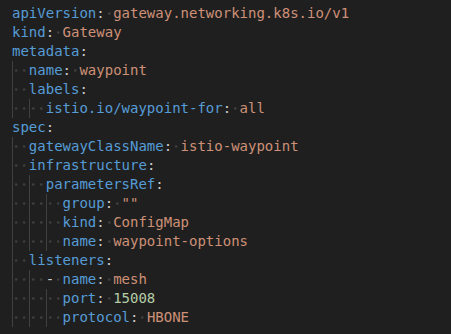
The label (istio.io/waypoint-for: all) is needed so we can attach the waypoint to our services. The parametersRef is hooked up to the application environment config and passes in a range of environment variables that the waypoint requires. Currently, these are only used by the Envoy filter. The protocol that each Istio component uses to communicate is the HTTP-Based Overlay Network Environment (HBONE). HBONE is an HTTP/2-based tunnel used by Istio to securely carry service-to-service traffic through sidecars (or ambient proxies). It provides mTLS encryption, identity, and policy enforcement without requiring changes to your applications.
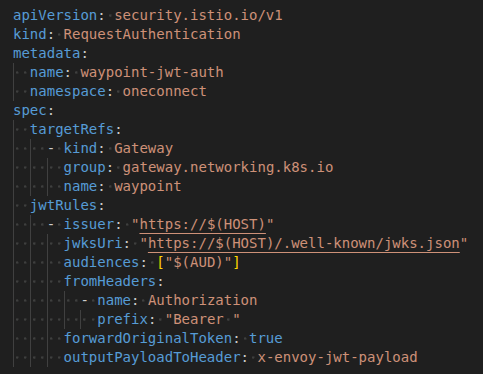
The RequestAuthentication step attaches JWT authentication configuration to the waypoint gateway. This ensures that only JWTs issued by the specified issuer and verified by the jwksUri are trusted. The JWT must also contain an audience that matches the client ID of the Cognito application.
The fromHeaders section extracts the bearer token from the request, the forwardOriginalToken field ensures each request retains the authorization token, and the outputPayloadToHeader: x-envoy-jwt-payload field extracts the payload from the bearer token and passes it as a header named x-envoy-jwt-payload. This JWT contains all the user information passed down from Cognito.
The AuthorizationPolicy step hooks the waypoint into the oauth2-proxy external provider. oauth2-proxy is a component that sits in front of your application and handles the OAuth2/OpenID Connect flow.
This step is responsible for creating and managing user sessions, redirecting unauthenticated users to the login page, and redirecting users back to the login page after a successful logout. It also handles the OAuth2 callback flow, exchanges authorization codes for tokens, verifies the JWT (including issuer, signature, and audience), and ensures only valid tokens are accepted.
Additionally, it injects user identity information into request headers, maintains session cookies, and forwards authenticated users to the appropriate backend service or page.
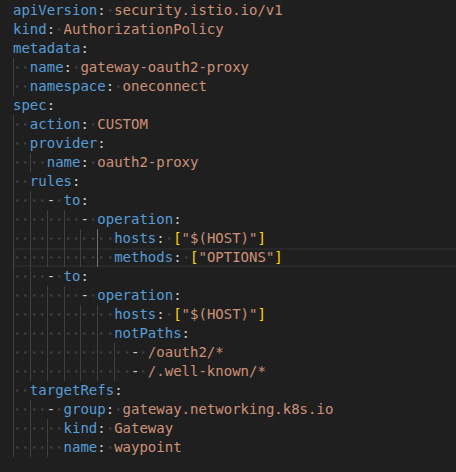
Once you enter your email and password, the steps described above will be executed. If the authorization and authentication processes successfully validate your login, you will be redirected to the application’s dashboard.
After a successful login, session-based cookies are created and stored in your browser to maintain your authenticated state throughout the session. These cookies do not contain any sensitive data; instead, they store important metadata such as the session ID, CSRF tokens, and security flags (e.g., Secure, HttpOnly, and SameSite).
Authenticated requests go directly to the application as the session and claims have already been injected.
Envoy Filter
An Envoy filter (WebAssembly plugin) has been implemented that is attached to the waypoint. The underlying waypoint code has been implemented in Rust and runs during the authorization phase of each request.
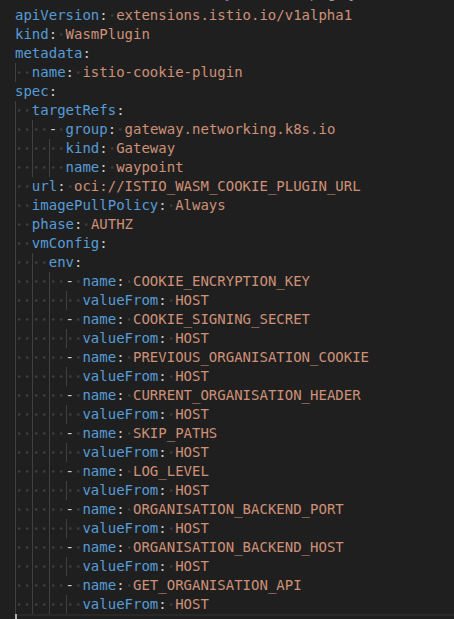
The targetRef is what connects the configuration to the waypoint. The phase indicates the stage of the API call at which the plugin runs. The vmConfig includes a range of environment variables that are passed into the waypoint and are required for the plugin to run.
The Envoy filter provides a centralized layer that acts like middleware and performs three main tasks:
- It decodes and unsigns the
previouslySelectedOrganisationcookie, which is encoded and signed in the feature-organisation-backend. - It injects the
x-currently-selected-organisationheader into each request. If no organisation is selected, it injects the first bootstrapped organisation. - It injects the
x-supported-featuresheader into each request. This allows applications to allow or deny API calls to specific functionality based on a shared header attached to every request.
Since these headers are injected during the Authorization flow, they are completely hidden and not visible in the developer console.
JWT Enrichment
JWT enrichment occurs every time a user logs in. This is implemented using an AWS Cognito Lambda function.
A separate pathway exists just for JWT enrichment in the form of an internal gateway that has its own security group attached and is only visible to the private subnets inside the VPC. The Lambda function is placed inside this VPC, within these private subnets, and the security group that the internal gateway expects is attached to it.
Each time the user logs into the application, the Cognito Lambda function will run. At this stage, the only field being added to the JWT is the userType field. The user stored in Cognito and the user stored in onboarding make use of a shared userId.
On login, an API call is made to onboarding that returns that user. This is a machine-to-machine API call and is excluded from the authorization pipeline. The privilege field is retrieved from the object returned by onboarding and converted to a userType field that is then attached so that every request made within the application now has a userType field. This provides a more stable claim and decouples the JWT logic from the backend database.
Logout flow
On logout, a call is made to the feature user backend. that clears all cookies and session tokens related to the application. The page is redirected to the home page such as oneconnect.demo.alliedtelesistest.com.